 Git Nav
Delete squash-merged Git branches
By Git Nav · Updated
A squash merge can put all of a branch's changes on main while leaving the original branch out of git branch --merged main. That command checks commit ancestry. The squash creates a new commit, so the original branch tip is still outside main's history. To clean up that branch, check the changes that landed or a matching merged pull request.
Why Git still calls the branch unmerged
Suppose feature contains commits B and C, and main receives their combined changes as S. The files can contain the same work, but S has a different identity and does not make C an ancestor of main. This is why a successful squash merge and an apparently unmerged local branch can coexist.
    B---C  feature
   /
  A----S   main

  git branch --merged main
Git's branch documentation defines --merged in terms of reachable tips. The squash option prepares the combined changes without recording a merge parent. Branch names and commit subjects cannot establish that the work landed.
Check what actually landed
Start by fetching from your remote so the comparison uses current remote-tracking references. For a branch called feature targeting origin/main, inspect its combined patch and the proposed squash commit:
git fetch origin
git diff origin/main...feature
git show <squash-commit>
Replace <squash-commit> with the hash from the merged pull request or main's history. The three-dot diff starts at the merge base, so it can still show the branch's original changes after a squash. A nonempty result is not proof that the changes are missing from main. Compare the patches and check whether any commits were added to the branch after it merged.
Preview the cleanup in Git Nav
Git Nav is a free Git client for macOS, Windows and Linux. Its Clean merged branches action opens a preview grouped by the evidence for deleting each local branch:
- Merged pull request: the recorded pull request head matches the local branch tip. This uses GitHub pull request data through the
ghCLI. - Merged into the default branch: the branch has no commits outside the default branch's ancestry.
- Squashed into the default branch: the branch's content matches a candidate commit on the default branch. This local check can work without a pull request.
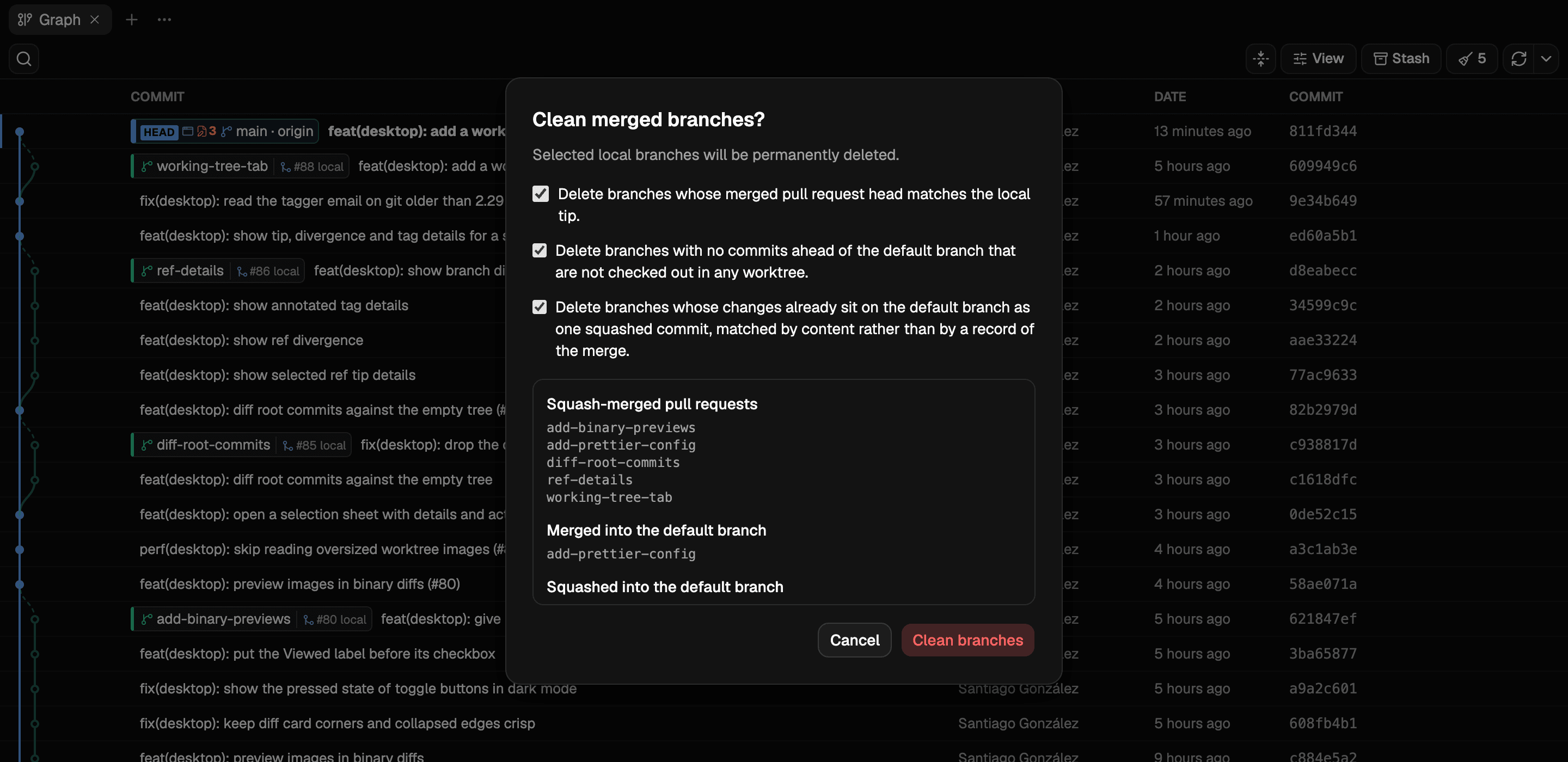
- Open the repository and choose Clean merged branches from the graph toolbar.
- Enable the cleanup reasons you want to use. Read the branch names in the preview before proceeding.
- Choose Clean branches to delete the candidates shown for those options.
What a content match establishes
Git Nav compares tree content or the changed paths and a stable patch ID. This is evidence that the patch landed, not a record of the merge. Conflict resolution can change a patch enough to prevent a match; a later revert can also make a historically merged change absent from today's files. Inspect the comparison when deciding whether you still need the branch.
Cleanup protects main, master and the default branch. The ancestry and content-matching rules also leave out branches checked out in a worktree; Git refuses to delete a checked-out branch. Cleanup deletes local branch references. A remote branch has its own lifecycle on the remote server.
For the comparison itself, see two-dot and three-dot Git diffs. If a branch is still checked out elsewhere, find its worktree first.